My Preferences and Profile
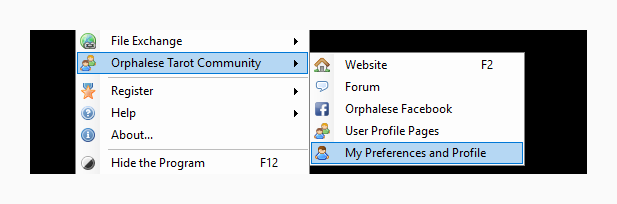
The My Preferences and Profile page is launched by selecting My Preferences and Profile off the Orphalese Tarot Community menu.
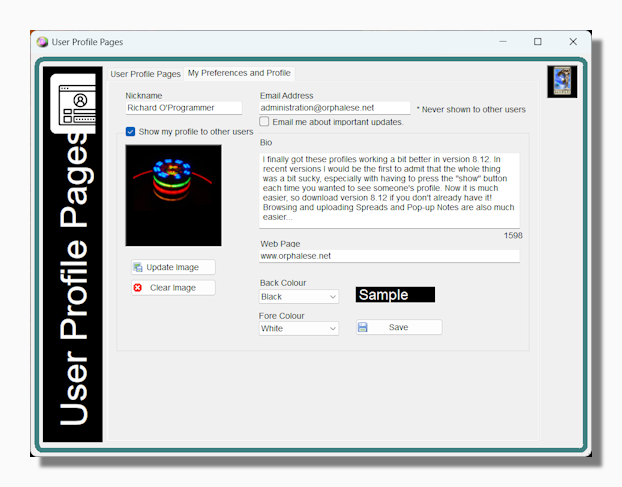
This page is where you decide if your user profile will be visible to other users of the program and where you customize its appearance. It is also the place where you can edit important information such as your contact email address.
Tip: The most important piece of data on this page is your email address. If your email address is up to date then you can recover your registration code for the program whenever you want via an automatic process. This process may take much longer if your email address is not up to date and your code has to be recovered manually. Please keep your email address up to date!
The preferences you can control using this tool are:
Nickname: This is the name that will appear for you in your profile page. At some future point when I re-integrate the Forum with the main database it will also be the name that appears if you post on the Forum.
Email Updates Check: I recommend checking this option if you want to receive a notification when there is an important update to the program. Checking this option will not expose you to any spam. None of the Orphalese user data is ever shared with anyone else and I am very hesitant to send out bulk emails so as not to upset people. At the time of writing, in the last ten years I have only sent out emails to all users on two occasions.
Profile Picture: This is the picture that will appear for you in your profile page.
Bio: This is the biographical information that will appear for you in your profile page.
Back Colour: This is the back colour of your profile page as shown by the sample text.
Fore Colour: This is the fore colour of your profile page as shown by the sample text.
Tip: This topic and the My Preferences and Profile topic both refer to this form. If you click either User Profile Pages or My Preferences and Profile the same window opens, the difference is in which of the two principal tabs are selected.